产品简介
USB Redirector Technician Edition 是一款提供无缝远程访问 USB 设备的软件,用于刷写固件、配置、编程或任何其他类型的 USB 设备维护服务。顾名思义,它将 USB 设备从客户端"重定向"到技术人员,从而允许进行各种远程维护。重定向的设备看起来就像直接插入了技术人员的电脑一样。
USB Redirector Technician Edition 必须安装在 USB 设备将被重定向到的电脑上(即技术人员的电脑)。该产品附带一个免费的 Customer Module(客户模块),这是一个便携且易于使用的应用程序,帮助客户将其设备重定向给技术人员。
USB Redirector Technician Edition 支持通过互联网、局域网、无线网络、VPN 或任何其他网络连接进行重定向。
请随时查阅本手册以了解更多关于如何使用 USB Redirector Technician Edition 的信息。感谢您选择我们的产品!
术语说明
- 客户电脑(USB 服务器) — 指 USB 设备实际插入 USB 端口的电脑。此电脑充当 USB 服务器。
- 技术人员电脑(USB 客户端) — 指 USB 设备被重定向到的电脑,用于维修服务。此电脑充当 USB 客户端。
系统要求
USB Redirector Technician Edition 支持以下操作系统:
- Windows Vista(64 位需要 SP2 及 KB4474419 更新)
- Windows Server 2008(64 位需要 SP2 及 KB4474419 更新)
- Windows 7(64 位需要 SP1 及 KB4474419 更新)
- Windows Server 2008 R2(需要 SP1 及 KB4474419 更新)
- Windows 8
- Windows Server 2012
- Windows 8.1
- Windows Server 2012 R2
- Windows 10
- Windows Server 2016
- Windows Server 2019
- Windows 11
- Windows Server 2022
- Windows Server 2025
支持 32 位、64 位和 ARM 架构。
快速入门
USB Redirector Technician Edition 非常易于使用。但建议正确配置网络环境。以下三个步骤将帮助您快速上手:
用户界面
主窗口
启动 USB Redirector Technician Edition 后,您可以看到其主窗口:
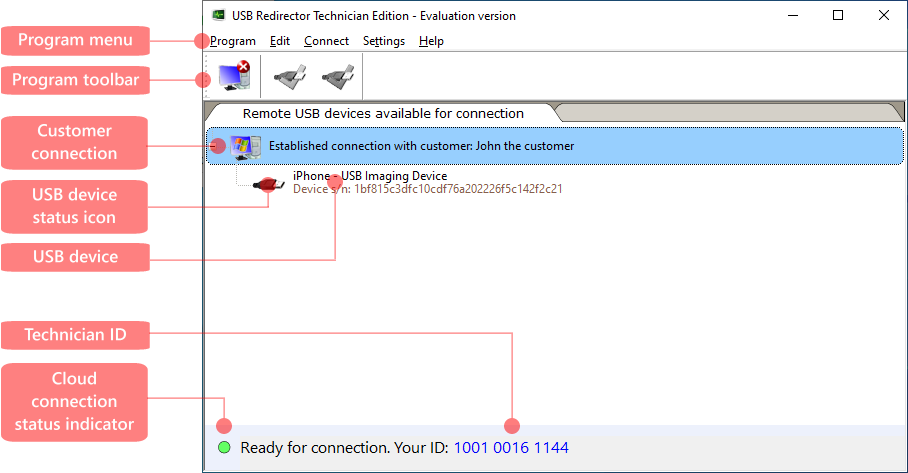
窗口显示当前连接到技术人员的远程客户列表及其 USB 设备。每个 USB 设备都以状态图标显示。要管理设备,您可以使用程序菜单中的相应项目或工具栏上的按钮。
程序菜单

工具栏
工具栏按钮
| 按钮 | 功能 |
|---|---|
 |
断开所选客户连接 |
 |
连接所选 USB 设备 |
 |
断开所选 USB 设备 |
USB 设备状态
USB Redirector Technician Edition 中每个可用的 USB 设备都有由图标指示的状态。
远程 USB 设备的状态图标
| 图标 | 说明 |
|---|---|
 |
USB 设备可用于连接 — 可以随时将其连接到您的电脑。 |
 |
USB 设备已连接 — USB 设备已从远程客户连接到您的电脑。 |
云连接状态
与云服务器的连接由云连接状态指示器显示。它可以显示以下状态:
云连接状态
| 图标 | 说明 |
|---|---|
 |
已建立云连接。程序已准备好与客户连接。 |
 |
已建立云连接,但性能可能受限。建议在路由器上配置端口转发以获得最佳性能。 |
 |
无法连接云服务器。请检查您的互联网连接、防火墙设置等。 |
程序设置
常规首选项
要更改程序的常规设置,请选择菜单 Settings > Preferences,然后切换到 General 选项卡:
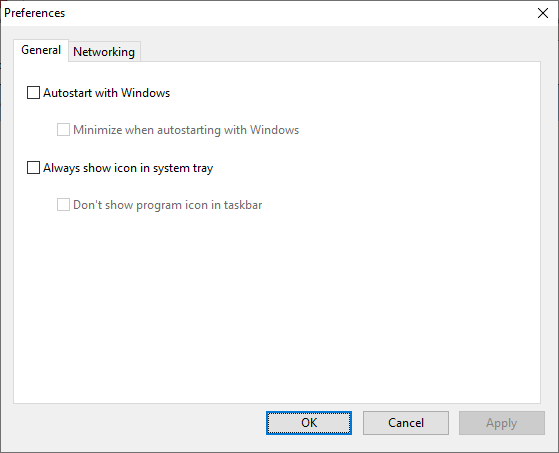
- 启用 Autostart with Windows 选项,让 USB Redirector Technician Edition 随 Windows 自动启动。
- 启用 Always show icon in system tray 选项,在系统托盘区域显示程序图标。
要保存新设置,点击 OK。如果要取消更改,点击 Cancel。
网络首选项
要更改程序的网络设置,请选择菜单 Settings > Preferences,然后切换到 Networking 选项卡:
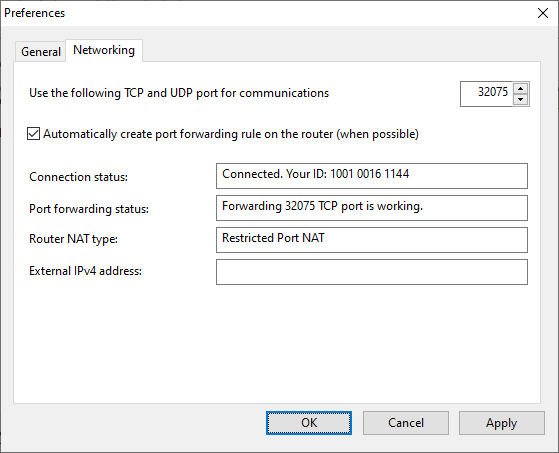
- 要更改 USB Redirector Technician Edition 用于通信的 TCP 和 UDP 端口号,只需输入新的端口号并点击 OK。USB Redirector Technician Edition 将在后续所有连接中使用新端口号。
- 如果您已在路由器上手动创建了端口转发规则,可以禁用 Automatically create port forwarding rule on the router 设置。
要保存新设置,点击 OK。如果要取消更改,点击 Cancel。
USB 设备属性
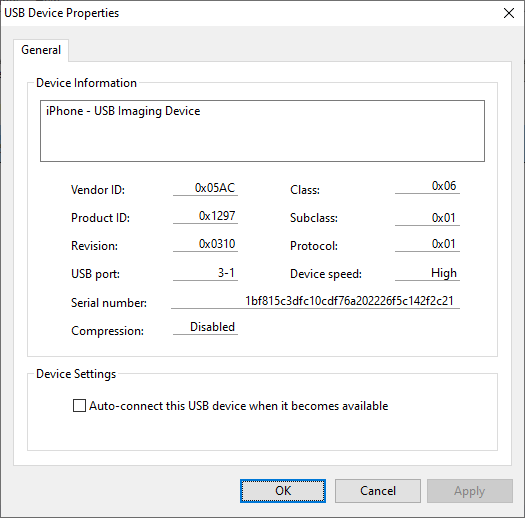
每个 USB 设备的属性可以通过 USB Device Properties 窗口访问。要打开此窗口,您需要双击所选 USB 设备或选择菜单 Edit > USB Device...
在这里您可以找到有关 USB 设备的详细信息并更改其自动连接选项。
操作指南
准备技术人员电脑进行远程维修
在开始使用 USB Redirector Technician Edition 之前,您需要设置网络环境。以下指南将帮助您完成设置。
USB Redirector Technician Edition 使用 TCP 和 UDP 连接与客户电脑通信并重定向 USB 设备。默认使用的端口号为 32075。您可以通过网络设置更改默认端口号。
如果您使用第三方防火墙或其他网络安全软件,请将其配置为允许 USB Redirector Technician Edition 的入站和出站 TCP 和 UDP 连接。
如果您通过路由器连接到互联网,您可能需要在路由器上配置端口转发。这不是绝对必要的,但有助于获得最佳性能。
准备客户电脑进行远程维修
要允许客户将其 USB 设备重定向给技术人员,您需要将 USB Redirector Technician Edition 的 Customer Module 交付给他们。这可以通过下载、电子邮件或其他方式完成。客户必须在其电脑上启动该模块并按照提供的说明操作。
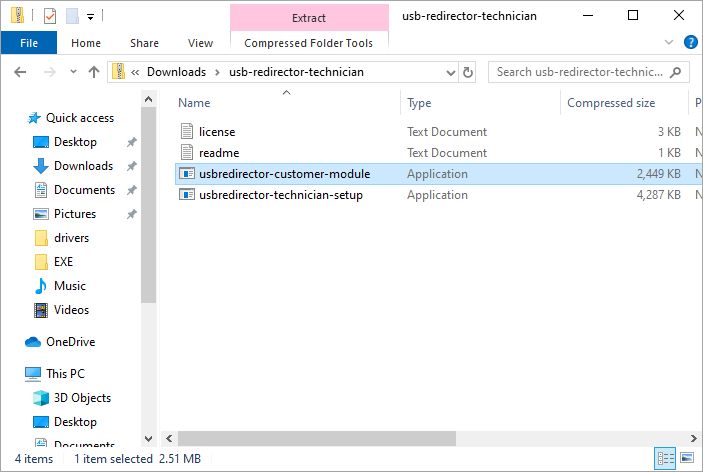
Customer Module 位于下载的 USB Redirector Technician Edition 安装包内:
重定向 USB 设备进行维修
通过 USB Redirector Technician Edition 重定向 USB 设备非常简单,您需要:
详细步骤请参阅以下说明。
在客户电脑上
启动 USB Redirector Technician Edition 的 Customer Module,等待其初始化完成。初始化完成后,您应该看到以下消息:
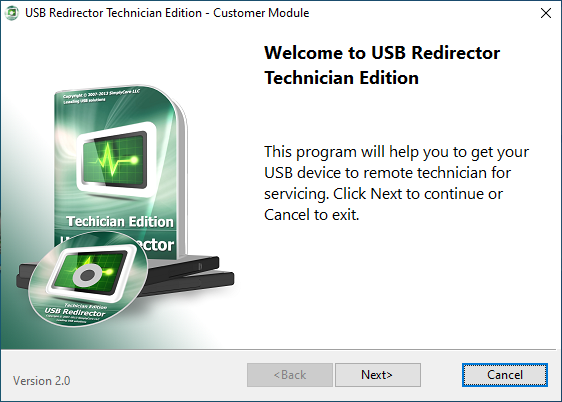
要继续,点击 Next 按钮。USB Redirector Technician Edition 将进入下一步,客户需要输入您的 Technician ID(技术人员 ID)并填写 Additional information(附加信息),以帮助您区分不同的客户(可以是订单号、电子邮件地址、姓名或任何其他文本)。
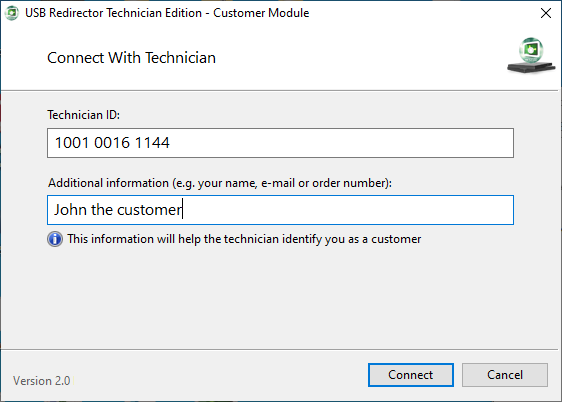
填写完字段后,点击 Connect 与技术人员建立连接。连接进度将在下一个窗口中显示:
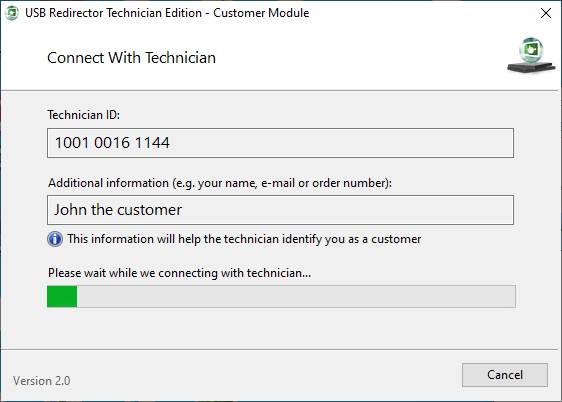
一旦连接建立,USB Redirector Technician Edition 会要求客户插入 USB 设备:
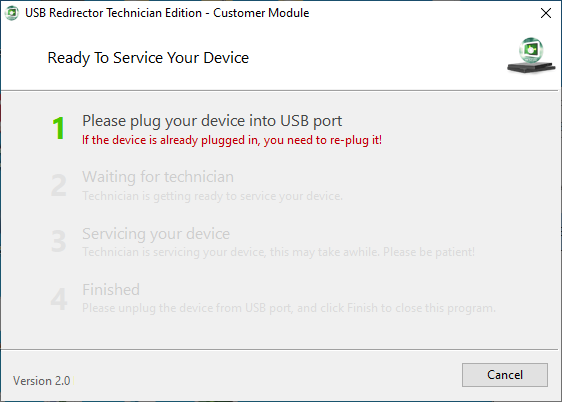
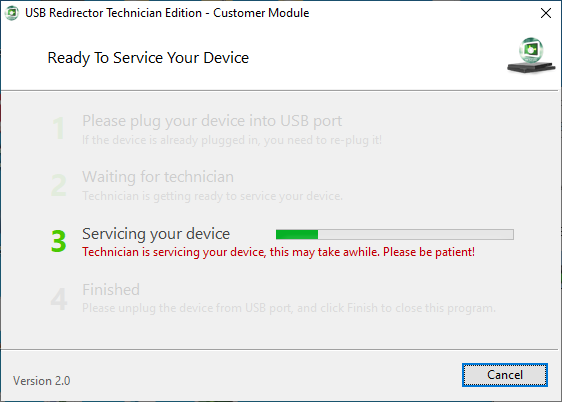
请按照此窗口中的所有步骤操作。当前步骤将被高亮显示:
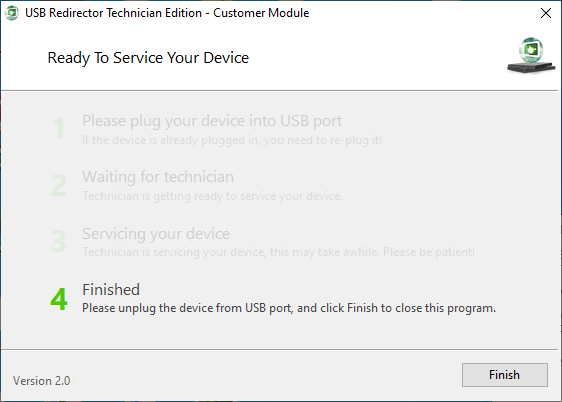
到达最后一步后,客户可以从 USB 端口拔出设备:
在技术人员电脑上
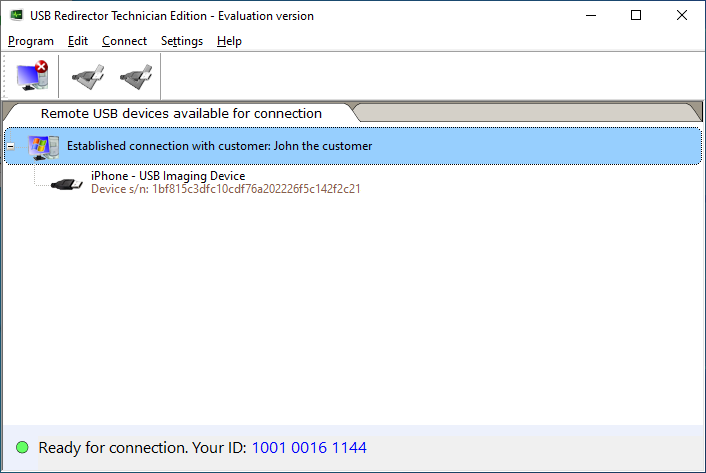
当客户连接时,它将显示在 USB Redirector Technician Edition 窗口中:
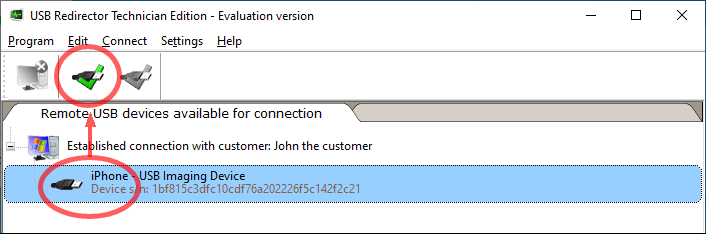
要开始维修 USB 设备,您需要将设备连接到您的电脑。只需选择设备并点击工具栏上的 Connect 按钮:
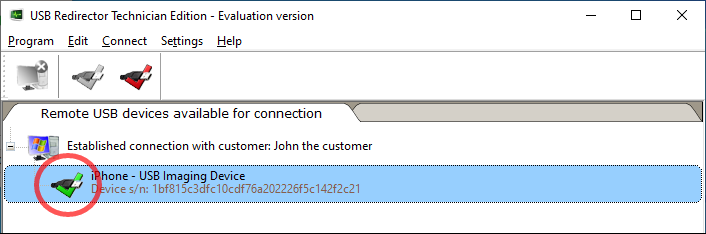
一旦 USB 设备连接成功,其图标会变为绿色对勾:
现在您可以开始维修 USB 设备,就像它直接插在您电脑的 USB 端口上一样!
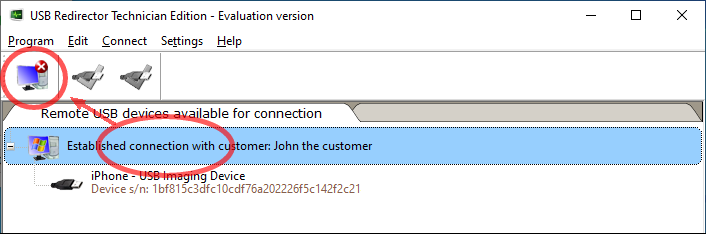
维修完成后,您需要断开客户连接。为此,选择客户连接并点击 Disconnect Customer 按钮。断开客户连接将使 Customer Module 进入步骤 4(见上文)。
许可证激活
为什么要购买 USB Redirector Technician Edition?
- 在 15 天评估期结束后继续使用 USB Redirector Technician Edition。
- 授权版本允许同时服务最大许可数量的客户。
- 我们的支持团队将乐意协助您的任何请求或问题。
- 您将免费获得所有小版本更新。
- 通过注册,您支持 USB Redirector Technician Edition 的未来开发。
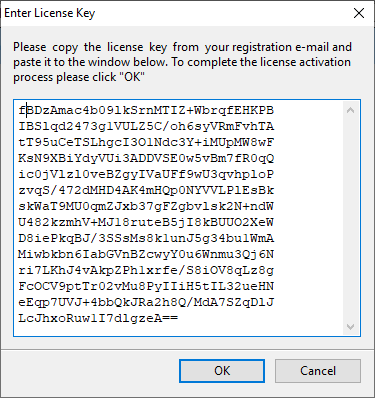
输入许可证密钥的步骤
最终用户许可协议
以下是 USB Redirector Technician Edition 最终用户许可协议(EULA)的完整英文原文。该协议是您与许可方 SimplyCore LLC 之间具有法律约束力的标准格式协议。
PLEASE CAREFULLY READ THE FOLLOWING LEGAL AGREEMENT
THIS EULA IS A STANDARD FORM LEGALLY BINDING AGREEMENT BETWEEN THE INDIVIDUAL CONSUMER OR BUSINESS ENTITY THAT WILL USE THE SOFTWARE AND THE LICENSOR. THE EULA GOVERNS THE TERMS UNDER WHICH YOU MAY OBTAIN AND USE THE SOFTWARE. YOU ACCEPT THE TERMS OF THIS EULA BY MAKING A PURCHASE, BY DOWNLOADING, INSTALLING, ACCESSING, OR USING THE SOFTWARE.
Under the EULA, intellectual property rights in the Software are not transferred to your ownership.
If you would like to use the Software in a manner not covered by the EULA, you must obtain the prior written permission of the Licensor, which may provide additional terms and/or charges.
If you do not agree to this Agreement, you should (a) not download, install, access or use the Software; and (b) promptly return the Software and proof of entitlement to the Licensor from whom you acquired the Software.
1. DEFINITIONS
"EULA" means this End User License Agreement;
"SimplyCore LLC" or "Licensor" means a legal entity registered in accordance with the legislation of Ukraine. SimplyCore LLC is the copyright owner of the USB Redirector Technician Edition.
"USB Redirector Technician Edition" or "Software" means software product that allows redirecting over the Internet USB devices from a customer to a technician for maintenance service, such as flashing, re-programming, or other types of service using cloud technology. The Software consists of two parts: 1) USB Redirector Technician Edition which is the software installed on the technician's computer. 2) Customer Module which runs on the customer's computer without installation.
"Technician", "you" means an individual consumer or any legal entity (or its representative) who obtained the Software and on whose behalf it is used.
"Customer" means your customer or another person to whom you send Customer Module in order to redirect their USB devices to you and provide with remote servicing.
2. GRANT OF LICENSE AND RESTRICTIONS OF USE
2.1. The Licensor grants you a non-exclusive limited revocable non-transferable license to use the Software in a specific manner provided that you comply with the terms of the EULA.
2.2. The license becomes effective when you obtain the Software from the Website or other sources.
2.3. Subject to your continuous compliance with this EULA and payment of the applicable license fees, the Licensor grants you a license to install and use the Software: (a) worldwide, (b) during the term of such license ("License Term"), (c) within the scope of the License Type and on the permitted number of your computers, and (d) in a manner consistent with the terms of this EULA.
2.4. License Types:
2.4.1. Evaluation License. This License is provided free of charge for the period of 15 days as soon as you install each new version of the Software for the first time.
2.4.2. Standard License. This License is available on a subscription basis and remains valid for as long as your subscription is active. If you obtain the Standard License as an individual, the license applies to the use of the Software on three (3) computers in your ownership. If you obtain the Standard License as an entity, the license applies to the use of the Software on all computers owned by the entity within one site.
2.4.3. Enterprise License. This License may be granted only to an entity on a subscription basis. The License applies to the use of the Software on an unlimited number of computers owned by the entity within all offices worldwide.
2.5. The Customer Module can be freely redistributed without restrictions via download, email, or through other means.
2.6. Each License allows for a certain number of Customer connections to be carried out simultaneously. Each connection can redirect up to 3 USB devices simultaneously.
3. PRICE AND PAYMENTS
3.1. You obtain the appropriate License Type under the terms of the EULA if you successfully make payments for the purchase of the Software under the terms of chosen pricing model.
4. OBLIGATIONS AND LIABILITY
4.3. You shall not copy, modify, distribute, publish, reverse-engineer, decompile, disassemble the Software in whole or in part, or create any derivative works from the Software.
4.7. The Software is provided to you on an "as is" and "as available" basis. The use of the Software is at your own risk.
5. DATA PROTECTION
5.1. Each Party agrees that, in the performance of its respective obligations under the EULA, the Party shall try its best to comply with the provisions of the General Data Protection Regulation (GDPR) to the extent it applies to each of them.
6. TERMS AND TERMINATION
6.1. The EULA shall be valid between you and the Licensor during the validity term of exclusive proprietary copyright under the applicable law unless the termination of the EULA occurs.
完整的 EULA 可在 USB Redirector Technician Edition 程序内查阅,或访问 英文原版 EULA。
联系与支持
技术支持由 SimplyCore LLC 提供。通常我们会在几小时内回复电子邮件,但有时可能需要长达 24 小时。请在周末和节假日允许长达 48 小时的回复时间。
| 项目 | 详情 |
|---|---|
| 官网 | https://www.incentivespro.com |
| 产品网站 | https://www.usb-redirector.com |
| 技术支持 | support@incentivespro.com |
| 销售咨询 | sales@incentivespro.com |
| 中国授权经销商 | support@mail.apsgo.com(APSGO) |
联系技术支持时,请尽可能提供详细信息,包括您使用的 USB Redirector Technician Edition 版本、Windows 版本(包括 Service Pack 号)以及详细的问题描述。